Page 1 of 1
5.1 discrete WAVs to 2.0 Stereo Downmix workflow via Web Interface
Posted: Mon Jun 01, 2026 11:33 am
by ring4life70
Hi everyone,
I need some help building a workflow to perform a 5.1 to Stereo downmix.
Here is my specific usecase: I need to submit 6 separate mono WAV files (L, R, C, LFE, Ls, Rs) through the FFAStrans Web Interface, and I want the workflow to downmix them into a single 2.0 stereo WAV file.
Could anyone guide me on the best approach to achieve this? Specifically, how should I handle the multiple file inputs from the web interface and combine them using the correct attenuation coefficients (e.g., Lo/Ro standard) without clipping?
Any help, screenshots, or workflow examples would be greatly appreciated!
Thanks in advance,
Re: 5.1 discrete WAVs to 2.0 Stereo Downmix workflow via Web Interface
Posted: Mon Jun 01, 2026 10:02 pm
by emcodem
Heyho,
honestly i wouldn't do that in webinterface as it is today, at least not when there are other "users" operating the workflow later on. It would require webinterface to check if the user selected exactly 6 files with the correct naming convention and only let them start the workflow when the requirements are fullfilled - something webint cant do today..
My approach for something that lightweight would generally not be to drag it through a heavy workflow engine, unless of course there is more to do than just this. You know, these days we just ask the AI to code stuff and it magically happens... so my take on your problem in the year 2026 is to ask Claude to do this in a simple client side only simple html page. It is attached in the zip (just unzip the html and run in browser - if this way fits your needs, i can show you how to serve the custom html from webinterface if you prefer this).
Re: 5.1 discrete WAVs to 2.0 Stereo Downmix workflow via Web Interface
Posted: Wed Jun 03, 2026 9:35 am
by ring4life70
Hi,
Thank you so much for your feedback and for providing the HTML alternative! I really appreciate your help and the effort you put into coding that page.
However, I would still prefer to stick with the FFAStrans WebInterface for this workflow, mainly for two reasons:
Unified User Experience: I strongly prefer having my users interact with a single, centralized interface for all their transcoding and processing tasks, rather than introducing a separate web page just for this specific operation. Keeping everything inside the FFAStrans WebInterface prevents confusion and streamlines our internal operations.
Bulk File Upload & Naming Convention: With the FFAStrans WebInterface (using the webui_stitch trick), users have the ability to upload all 6 discrete audio files simultaneously in one single action. Furthermore, identifying the channels is quite straight forward for us because our source files strictly follow a standard naming convention, always using the exact suffixes: .L, .R, .C, .LFE, .LS, and .RS.
Since the files are cleanly named and the single-job submission is already working via webui_stitch, I would really love to find a way to serve this or make it fully stable within the WebInterface ecosystem.
If you could show me how to serve a custom HTML or better integrate this logic directly from the WebInterface as you mentioned, that would be amazing and would fit our needs perfectly!
Thanks again for your amazing support
Re: 5.1 discrete WAVs to 2.0 Stereo Downmix workflow via Web Interface
Posted: Wed Jun 03, 2026 11:45 am
by emcodem
ring4life70 wrote: Wed Jun 03, 2026 9:35 am
I really appreciate your help and the effort you put into coding that page.
No worries, no effort, all i did was post your message to claude and tested if the result works.
ring4life70 wrote: Wed Jun 03, 2026 9:35 am
strictly follow a standard naming convention, always using the exact suffixes: .L, .R, .C, .LFE, .LS, and .RS.
Thats good, it is mandatory to enable to do what you plan (without adding a custom script).
My approach would be to just sort the input files and then grab them from the submitted file array into separate variables, then exec ffmpeg.
In this example workflow, you'll need to test first if the sorting always results in the same order of channels using your naming convention.
After you made sure the order will be always the same, you note the order and in the first populate processor, change the mapping from sorted file index to the %s_fileX% variable, e.g. if your center is always the first file, you set:
Code: Select all
%s_file3% = $readarray("%s_sorted_files%", 1)
This is because in this example workflow, the s_fileX variable assume the standard mapping LRCLFELSRS, s_file1 must be L s_file2 must be R etc...
ring4life70 wrote: Wed Jun 03, 2026 9:35 am
If you could show me how to serve a custom HTML or better integrate this logic directly from the WebInterface as you mentioned, that would be amazing and would fit our needs perfectly!
I'll need to add a wiki article or make a youtube clip about that, how it works is that in the WebUI settings, you add the folder where your custom html lives to the "Added Folders". After that, you restart webinterface and it will serve the folder you added using the last folder as url.
For example, you add \\server\share\myhtml or C:\folder\mythml in the Added folders and restarted webint, then you can access your html using the url:
http://webinterface/myhtml/index.html (or whatever file you place in myhtml folder)
Of course you don't get any menu item or similar when you do that, so you need to figure out yourself how/where you publish a link to the html. What i often do for example is to set the job status to a link to some custom icon or html.
Re: 5.1 discrete WAVs to 2.0 Stereo Downmix workflow via Web Interface
Posted: Mon Jun 08, 2026 5:40 pm
by ring4life70
Hi emcodem,
Thank you so much! Your approach works perfectly and the WebUI integration tip is incredibly useful.
Now that the logic is clear, I need to adapt this workflow for another specific use case we have. Instead of a 5.1 downmix, we need to take 8 discrete mono files (representing 4 Stereo pairs: Audio 1 L/R, Audio 2 L/R, Audio 3 L/R, Audio 4 L/R) and mux them with the main video file into a multichannel output (ideally a .mov with 4 separate stereo tracks).
Given your example, I should be able to sort the 8 files in the array and assign them to variables (%s_audio1_L% to %s_audio4_R%).
Could you help me understand how to best scale your sorting/array logic for 8 files instead of 6? Specifically, once I have mapped %s_file1% to %s_file8% in the populate node, what is the best way to pass them to a Custom FFmpeg node without FFAStrans misinterpreting the input options? (I previously faced an issue where FFmpeg tried to apply output video options like -b:v directly to the input .wav files).
Thanks again for your amazing support!
Re: 5.1 discrete WAVs to 2.0 Stereo Downmix workflow via Web Interface
Posted: Mon Jun 08, 2026 7:26 pm
by emcodem
ring4life70 wrote: Mon Jun 08, 2026 5:40 pm
Custom FFmpeg node
Custom ffmpeg cannot help for this usecase, you need to use a bare commandline executor as shown in the example workflow or some smarter script. There is no logic at all in custom ffmpeg, all it does is to take s_source variable and write a commandline like ffmpeg -i "%s_source%" YOUROPTIONS "%internal_outputfile%".
The only good thing about custom ffmpeg is that the internal output file variable can be used later with a delivery processor in order to define output filename and delivery options. In your case, you have to use functions and variables to calculate the output path and filename. Small hint: these days you can easily ask the AI tool of your choice to write you some powershell or similar script that you can execute from your workflow and takes care about smart output delivery options and naming. You can even just tell the AI to write a full plugin processor if this is what you want, just post it the documentation:
https://ffastrans.com/wiki/doku.php?id= ... processors. (say: give me a zip to download) at the end...
ring4life70 wrote: Mon Jun 08, 2026 5:40 pm
pass them to a Custom FFmpeg node without FFAStrans misinterpreting the input options? (I previously faced an issue where FFmpeg tried to apply output video options like -b:v directly to the input .wav files).
the sorting itself keeps unchanged, no matter how many input files the user submits, it will sort the submitted filenames independent of how many there are. The only problem with that is that the sorting can only work when the input filenames follow a VERY strict naming convention.
ring4life70 wrote: Mon Jun 08, 2026 5:40 pm
previously faced an issue where FFmpeg tried to apply output video options like -b:v directly to the input .wav files
FFAStrans Workflows are by default pretty static, so without a customized userinterface as i proposed initially, you can always and very easy run into the problem that the users can start the job with any number of files. The scenario you describe where ffmpeg tries to apply an input option to an output is such a case, there was just not all 6 existing file variables filled with a value. In this case one of the inputs was just empty and the whole commandline does not work anymore.
There is one thing you can do tough, it is to use conditionals to check if the user submitted everything correctly, try like this:
Re: 5.1 discrete WAVs to 2.0 Stereo Downmix workflow via Web Interface
Posted: Sun Jun 21, 2026 4:15 pm
by FranceBB
I know that you wanted to use the Web Interface to do that, but this could also technically be done via a watchfolder and I actually created something similar in the past, so I've just re-adapted one of our workflows for this.
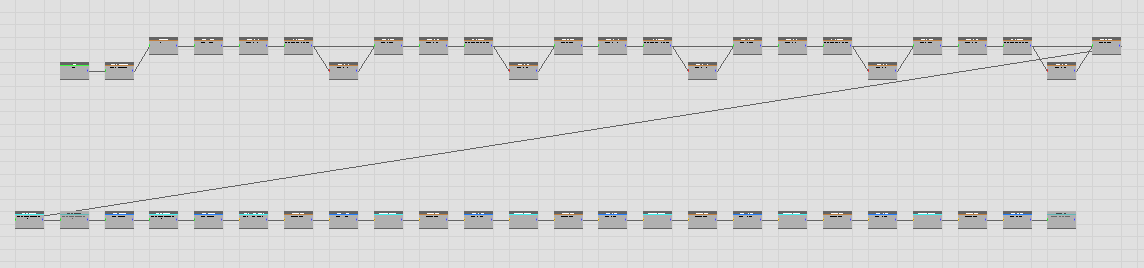
- Screenshot 2026-06-21 170618.png (15.65 KiB) Viewed 15887 times
- Make sure the input files are PCM .wav with identical names and different ending nomenclature depicting the audio channel layout like so:
_L.wav / _R.wav / _C.wav / _LFE.wav / _LS.wav / _RS.wav
For instance:
UAT03426_L.wav / UAT03426_R.wav / UAT03426_C.wav / UAT03426_LFE.wav / UAT03426_LS.wav / UAT03426_RS.wav
- The watchfolder will couple together the channels to create the 5.1 (i.e a process called "interleave") and it will encode it in PCM 24bit 48000Hz 5.1.
- it will then deliver this file in the output folder with the name _51.wav
- it will then perform the Stereo downmix, encode it in PCM 24bit 48000Hz 2.0 and deliver it in the output folder with the name _20.wav
- it will then move all the input files from the Input folder to the Output folder and rename them with _MO.wav (i.e "Master Original")
A few notes:
The file that will be picked up by the watchfolder is *_L.wav and it will then check for the existence of *_R.wav and wait for 3600 seconds (i.e 1h) if the file isn't there. This should allow plenty of time for all the files to be copied and readily available in the input folder.

Re: 5.1 discrete WAVs to 2.0 Stereo Downmix workflow via Web Interface
Posted: Mon Jun 22, 2026 2:27 pm
by ring4life70
thank you so much FranceBB