Page 2 of 3
Re: FFAStrans v1.4.0.7 - folder monitor sometimes stops seeing files
Posted: Mon Feb 16, 2026 8:17 am
by Silicon
Hi @emcodem and @admin
I'm facing similar or maybe identical issue. I've found out, that it is related to filename or complete UNC path length:
- if the filename is too long, the json created by monitor node, contains CR LF and such file is not processed by following nodes
- if the filename is reasonable short, the json created by monitor node, does not contain CR LF and such file is processed normally
See sample files attached
Re: FFAStrans v1.4.0.7 - folder monitor sometimes stops seeing files
Posted: Mon Feb 16, 2026 2:29 pm
by emcodem
Hey @Silicon
not sure if these issues are connected. I tried to reproduce yours but using 1.4.1 all seems to work normally.
Looking at the code, it seems that we write the formatted json (with \r\n\) only in the phase when the file has not been processed yet, so it makes sense what you see but it does not deliver hints about why the file has not been processed.
Currently i have no feeling about whats happening to you, where did you find the jsons, in the /i subfolder or directly, is it always reproduceable with "long" (its actually not really long is it) filenames?
Re: FFAStrans v1.4.0.7 - folder monitor sometimes stops seeing files
Posted: Mon Feb 16, 2026 6:28 pm
by Silicon
Hi @emcodem
I have found the json files in mons\guid folder not in .\i subfolder.
I'm afraid it can be (once again) related to the regional settings of Windows Server 2022
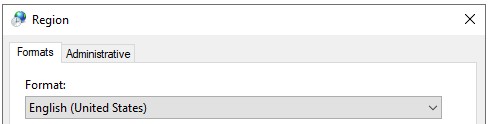
- WS2022-Region.jpg (10.35 KiB) Viewed 4045 times
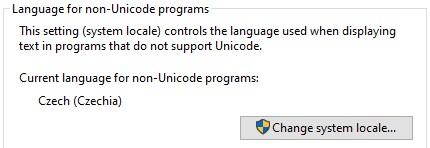
- WS2022-Locales.jpg (21.01 KiB) Viewed 4045 times
Re: FFAStrans v1.4.0.7 - folder monitor sometimes stops seeing files
Posted: Wed Feb 18, 2026 9:16 am
by emcodem
@Silicon
i did set up a VM with the OS and settings you provided but still not able to reproduce it unfortunately. Worked with the current release version 1.4.1 as downloaded from ffastrans.com...
There must be more about it than just the filenames. Are you able to reproduce the issue when you place a 0kb file with specified "bad" name in the watch? Whats your exact monitor settings? Does it also happen when you use e.g. \\localhost\c$\temp\longfoldername\longfilename ?
Re: FFAStrans v1.4.0.7 - folder monitor sometimes stops seeing files
Posted: Wed Feb 18, 2026 9:23 pm
by Silicon
@emcodem
I've got answers to few of your questions:
1) by dropping 0kb file with "long" filename 4636472_68c72bd169774e9a86cb0d697ba6cfd0_74c5be04b0504613928112ab531bc5ee.mp4 the result is identical ... file is ignored
2) as for monitor setting see the screenshot (I can PM to you the whole workflow if you want ... it is processing the MP4 files from AP agency)
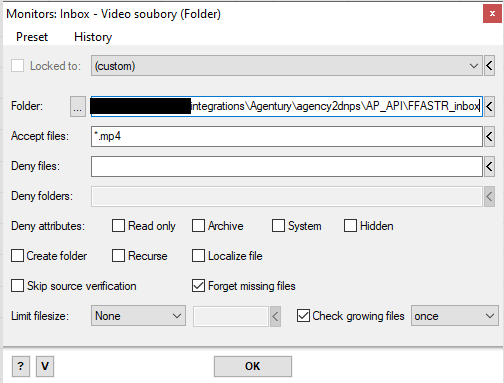
- FFAStr monitor.png (17.65 KiB) Viewed 3994 times
3) it happens also when using \\localhost\c$\
Re: FFAStrans v1.4.0.7 - folder monitor sometimes stops seeing files
Posted: Thu Feb 19, 2026 8:11 am
by emcodem
Thanks @Silicon can you please post the exact ffastrans version you have?
Re: FFAStrans v1.4.0.7 - folder monitor sometimes stops seeing files
Posted: Fri Feb 20, 2026 8:18 pm
by Silicon
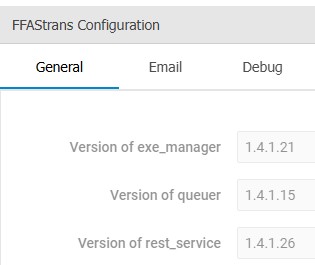
- FFAStrans.jpg (11.57 KiB) Viewed 3956 times
Re: FFAStrans v1.4.0.7 - folder monitor sometimes stops seeing files
Posted: Fri Mar 27, 2026 5:22 pm
by Silicon
HI dev team.
I'mm still facing the issue reported earlier - FFAStrans is not abke to process the files with filenames "too long", when too long means longer then 55. chars (without file ext).
Any advice? Anyone?
Re: FFAStrans v1.4.0.7 - folder monitor sometimes stops seeing files
Posted: Fri Mar 27, 2026 6:38 pm
by Silicon
Worth to mention, that it is working normally on Windows 10
Re: FFAStrans v1.4.0.7 - folder monitor sometimes stops seeing files
Posted: Sat Mar 28, 2026 6:56 pm
by admin
Hi Silicon,
In general FFAStrans should not have a problem with long file paths. It's many years ago we added support for dealing with long paths and filenames. However, it might be you have something in your flow that provoke some edge case bug in ffastrans.
If you make a new workflow and just add a Monitor node with just your path with long file name, will it pick up the files? If not, you need to provide som details about your file structure so we can see if there are some other not yet taken care of edge case. And of course, if your workflow fails with long file names we need job logs.
-steinar